The debug mode
Debug mode is quite handy for debugging component symbols. It displays the anchors of
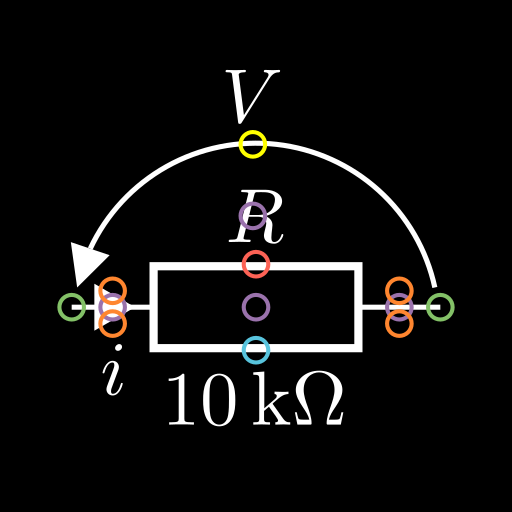
Markables in as coloured rings according to the following: [1]
Anchor type |
Colour |
|---|---|
Centre |
Purple |
Label |
Red |
Annotation |
Blue |
Terminal end |
Green |
Current label |
Orange |
Voltage label |
Yellow |
As a visual example, here is a resistor with a current and voltage arrow when rendered in debug mode.
Note
As terminals and voltage arrows are also Markable instances, they also
have purple centre anchors!
Activating the debug mode
To activate debug mode, set the debug configuration option to True:
config_eng.debug = True
# your code here...
or
with tempconfig_eng({"debug": True}):
    # your code here...
are your best in-code bets, though you can always use config files as well. See the configuration guide for more details on the configuration system.
Footnotes